Organization Selector
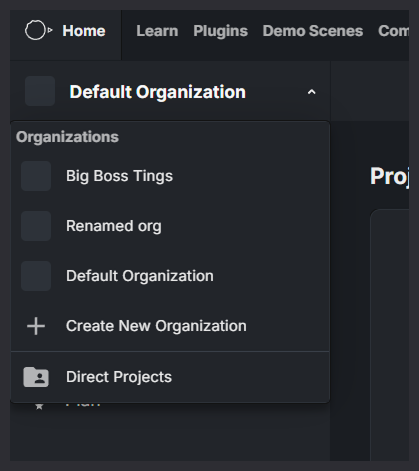
The Organization Selector (shown in the top-left banner) lets you switch between organizations and project views you have access to.
Organizations
This section lists all organizations you are a member of. Selecting an organization updates the dashboard to show:
- Projects that belong to that organization
- Organization-level settings, tracks, members, and plan details
Direct Projects
Selecting Direct Projects shows projects you have been invited to without being a member of the owning organization.
These are typically projects shared with you by another organization for collaboration or review. When viewing Direct Projects:
- Only the projects you are directly invited to are shown
- You do not gain access to the organization’s settings, members, or shared assets
- Your access is limited to the specific projects you were invited to
Creating a New Organization
Select Create New Organization to create a new organization and manage its projects, members, and shared assets.